The system sat unused for the better part of a year after I built it.
Not because it did not work. It worked fine. The board was structured, the columns mapped the case lifecycle, the tasks were ready to assign. Everything was in place. The problem was that nobody had any reason to trust it yet, and in a busy legal office, asking people to change how they work requires more than a good idea.
Most legal ops implementations fail at exactly this point. The tool gets built, someone sends a message explaining how it works, and then the team keeps doing what they were already doing. Not out of malice. Out of inertia. New systems require effort to learn and trust to adopt, and neither of those things appears just because the system is ready.
What actually moves a legal team is results. Specifically, results that are visible to the people who have not adopted the system yet.
This is the story of how a Microsoft Planner case management system went from something nobody wanted to use to something that spread to an entire office without a single mandate. What made adoption possible was not a better rollout strategy. It was a template that made the system easy to say yes to, a kickoff process that made the first case feel manageable, and a conditions check meeting that changed how the team talked about problems. The results did the rest.
If your office is managing a complex docket with no shared visibility into where cases actually stand, this is where to start. Not with the dashboard. Not with the automation. With the foundation.
The Template Is Why Saying Yes Was Easy.
Before getting into how adoption happened, it helps to understand why the system was easy to agree to in the first place. The answer is the template.
A court-martial follows a defined lifecycle. From the moment our office is notified of an incident, through investigation, preferral of charges, referral, arraignment, trial preparation, trial, and post-trial processing, the stages are predictable. The tasks within each stage are largely predictable too. Not identical across every case, but close enough that a standard template captures the overwhelming majority of what any given case will require.
That is what I built. A master Planner plan with every stage mapped as a column and every recurring task pre-loaded inside it. Each task carries a role tag indicating who typically owns that work: the special trial counsel, the trial counsel, the paralegal, support staff. The tags are not assignments. They are reference points for the kickoff meeting, so the team is not starting from a blank board and trying to remember what needs to happen next.
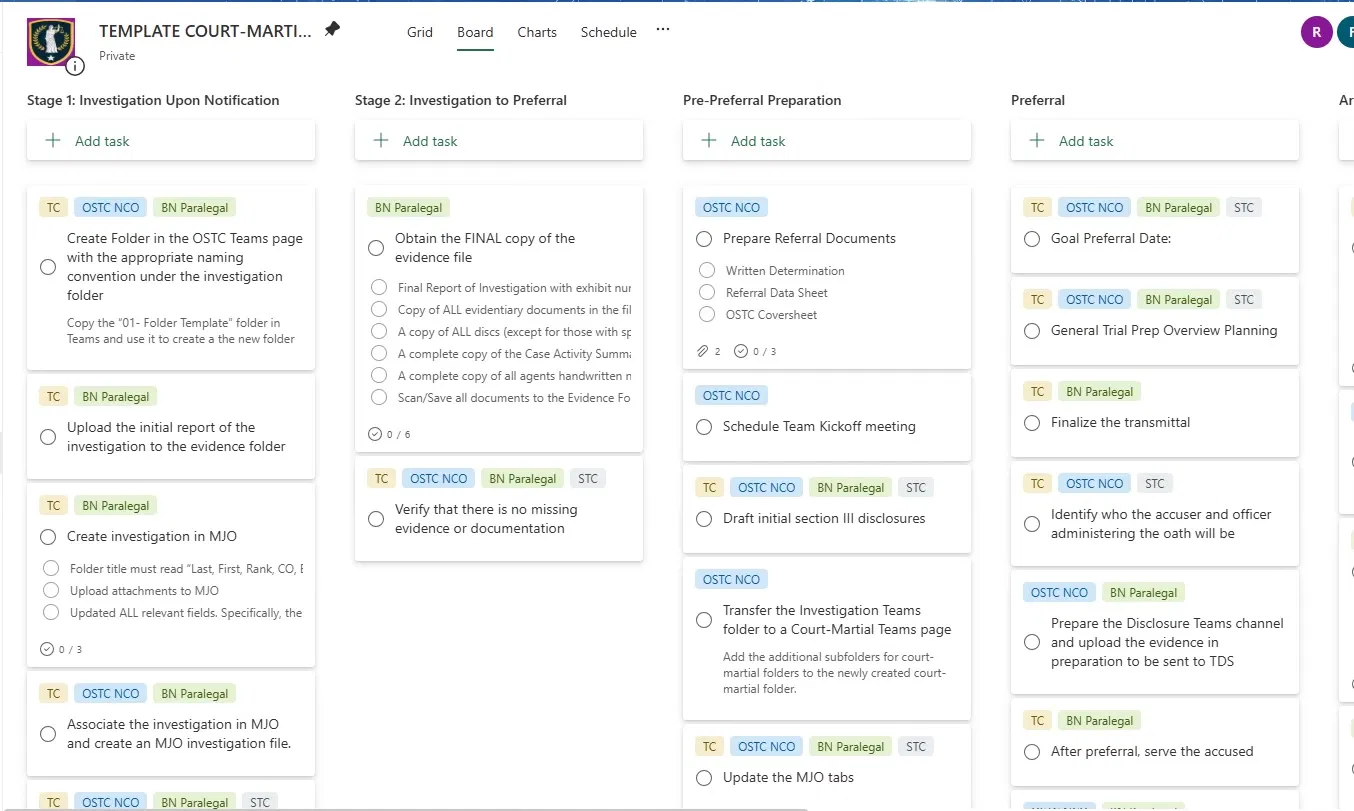
The template also includes document attachments directly on the relevant cards. NCIC check request memoranda, acknowledgement memos, reference guides for roles outside the core trial team — bailiff responsibilities, escort duties, procedural checklists. The documents are there when the team member opens the task. They do not have to go find them.
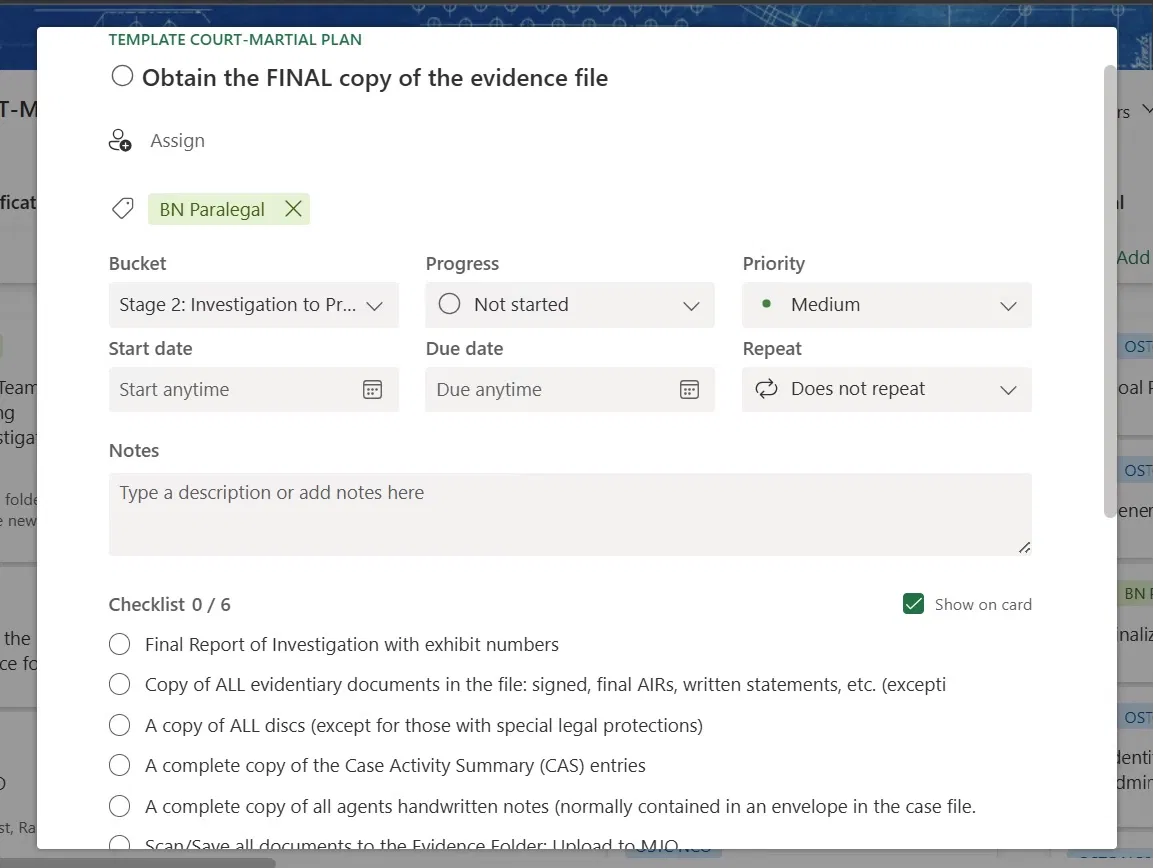
The result is that when a new case comes in, I can have a complete Planner plan ready for a kickoff meeting in minutes. I copy the template, rename the plan for the case, and it is ready. No setup meeting to build the board. No debate about what columns to use or what tasks belong where. The structure is already there.
This matters for adoption because it removes the most common objection to a new system: that it creates more work than it saves. An attorney looking at a pre-built plan with every task already mapped, every document already attached, and a paralegal who can run the kickoff does not have to do much to get started. The barrier is low enough that saying yes costs almost nothing.
The column and task logic transfers directly outside of a military justice context. A litigation practice can map its stages from intake through discovery, trial preparation, and post-trial. A corporate legal department can map a regulatory matter from initial notice through response, remediation, and closure. The specific stages will look different. The principle is the same: if the structure is already built, the team's energy goes into working the cases instead of organizing them.
The First Test.
The opportunity came out of a staffing change.
Our office was losing a paralegal, which meant one of our special trial counsel was going to have less support on his caseload at exactly the wrong time. He was newer than most attorneys in his role. Special trial counsel are typically selected after a few years of prosecutorial experience. He had been selected without it, which meant he had come to rely heavily on the operational side of case management in a way that more experienced attorneys sometimes do not. When I told him I would have to be more hands off from his cases going forward, I also told him I had a system that could help fill that gap.
He did not hesitate.
We picked four cases to start with and began scheduling kickoff meetings.
Each of those four cases had its own team. The STC supervised all of them, but the attorneys, paralegals, and support staff varied by case and by the structure of the legal office responsible for handling it. Depending on the case, a kickoff meeting might have anywhere from four to ten people in the room. He and I were the only continuity between all of them. Every other face at the table was new.
The kickoff meetings ran remotely over Microsoft Teams. I would share my screen, pull up the Planner, and walk through the system before we did anything else. The first thing I asked every time was whether everyone in the meeting felt comfortable trying out a tool like this. Nobody ever said no. But asking matters. It signals that the system exists to help the team, not to monitor them, and that distinction affects how people engage with it from the start. We asked it fresh with every new group, because every group deserved the same opportunity to opt in.
From there the meeting became a working session. We started with the next milestone. Depending on where the case stood, that might be preferral of charges, referral, or arraignment. From there we worked backwards through every task that needed to happen before we could reach it. As we moved through the task list, we assigned each item to the team member responsible for it. Attorneys took the legal work. Paralegals took the administrative tasks. Support staff got the logistical items. Everyone left the meeting knowing exactly what they owned and when it was due.
The last thing we scheduled before closing each meeting was the conditions check. More on that in the next section.
Those four cases started moving within weeks. Not because the attorneys suddenly became more diligent. Because everyone on the team could see exactly where each case stood, what was due, and who owned it. Cases that had been waiting on unclear next steps now had defined tasks with names attached to them. The ambiguity that lets work stall quietly was gone.
The Conditions Check.
Every kickoff meeting ended the same way. Before closing out, we scheduled one more meeting a few days before the milestone date. We called it the conditions check.
The purpose was straightforward. The team would come back together, look at the board, and answer three questions. Were there any outstanding tasks that had not been completed? Had anyone run into problems that were blocking their work? Did we need to push the goal date?
That last question mattered more than it might seem. Building in an explicit mechanism to revisit the milestone date changed the dynamic around deadlines. Missing a goal date was no longer a quiet failure that nobody acknowledged until the milestone passed. It was something the team could see coming, discuss openly, and respond to while there was still time to act.
What actually happened in those meetings surprised me at first. Team members would show up and volunteer that they were falling behind before anyone had to ask. Not because they were under pressure to confess, but because the meeting gave them a structured place to say it and the team gave them a productive response when they did.
The team could decide whether to redistribute the work, adjust the timeline, or bring in additional support. The problem got solved instead of hidden.
That is not how legal teams typically talk about capacity. The default is to absorb the pressure quietly and manage it individually until something slips. The conditions check replaced that default with something more useful. It made transparency the expected behavior rather than the uncomfortable one.
The accountability layer this creates is real, but it does not feel like surveillance. Nobody is being monitored. The board is visible to everyone, which means progress and the absence of it are both visible. The conditions check just creates the space for the team to respond to what the board is already showing them. That distinction is what makes it work.
The Proof Spread Itself.
About a month after the first four cases started moving, something shifted in the office.
Our second special trial counsel had been watching. She was more experienced than her junior colleague, carried a comparable caseload, and had her own established ways of managing her cases. She had not asked about the system. She had not expressed interest in it. She did not need to, because her cases were moving on their own well enough.
Then they stopped moving.
Her paralegal left. Without that support, the operational load of managing her caseload fell more directly on her, and the gaps that a good paralegal quietly fills became visible. Cases that had been progressing started stalling. She mentioned that she needed help getting things moving again.
I told her we were using a system I had built to do exactly that. She asked if I could do the same for her cases.
Results are more persuasive than any explanation of how a tool works.
What happened next followed the same pattern as the first four cases. Kickoff meetings with each case team. The opt-in question asked fresh with every new group. Working backwards from the next milestone, assigning tasks, closing with a scheduled conditions check. Her cases started moving the same way his had.
From there it spread further. Leadership noticed the pattern. Other offices working alongside ours started asking questions. I was eventually asked to teach an entirely separate legal office how to implement the system because they wanted to bring it into their own operations.
None of that happened because someone mandated a new tool. It happened because the results were visible to everyone who had not adopted the system yet, and visible results are the only adoption strategy that actually works.
What Your Team Needs to Start.
The infrastructure for this system is probably already in place.
Microsoft Planner is included in most Microsoft 365 subscriptions. If your organization uses Teams, SharePoint, or Outlook, you almost certainly have access to it. There is no additional software to purchase, no IT approval process for a new platform, and no budget conversation to have before you can build anything.
What you actually need is simpler than most legal ops implementations require. You need someone who understands your case lifecycle well enough to map it into columns. You need someone who can build the template plan and run the kickoff meetings. And you need one attorney willing to try it on a few cases before the results exist to speak for themselves.
The template build is the only significant upfront investment. It takes time to think through every stage of your case lifecycle, identify the recurring tasks within each stage, tag them by role, and attach the document templates your team uses regularly. Once that work is done, every case after it costs almost nothing to set up. The value compounds every time you copy the template for a new matter.
Column structure will look different depending on your practice. A litigation team might map stages from intake through discovery, motion practice, trial preparation, trial, and post-trial processing. A corporate legal department managing regulatory matters might run from initial notice through investigation, response, remediation, and closure. A compliance team tracking multi-phase deadlines will have its own lifecycle. The specific columns matter less than the principle behind them: the stages should reflect how work actually moves in your office, not how you wish it moved.
The person running the kickoff meetings does not need a project management certification. They need enough operational sensibility to facilitate a structured conversation, keep the team focused on the milestone, and make sure everyone leaves with a task and a due date. In most legal offices, that person already exists. They are usually a paralegal or a legal ops professional who has been informally doing this kind of coordination work for years without a system to support it.
The conditions check is the easiest part to implement and the most important not to skip. Schedule it at the kickoff. Put it on everyone's calendar before the meeting ends. A conditions check that gets added later, after the work is already in motion, is easy to deprioritize. One that was scheduled at the start of the case is harder to ignore.
You do not need buy-in from the whole team before you start. You need one person willing to try it. The results will handle the rest of the conversation.
The Foundation.
The system described in this post is not the finished product. It is where the finished product starts.
What we built in Microsoft Planner eventually grew into something more complex. A Power Automate pipeline pulling task data from every active case into a centralized SharePoint list. A six-page Power BI dashboard giving leadership a real-time view of the full docket. An automated calendar sync that pushed deadline notifications directly to the assigned team member's Outlook the moment a task was created.
But none of it would have existed without the Planner foundation. Not because the technology required it, but because the team did. The dashboard only works if the tasks are being updated. The automation only works if the data is accurate. The data is only accurate if the team is using the system. And the team only uses the system if someone built a template that made it easy to start, ran kickoff meetings that made it easy to commit, and scheduled conditions checks that made it easy to stay honest.
The technology is the easy part. Getting a legal team to change how it works is the hard part. Everything in this post is aimed at that problem.
Court-Martial Visibility System
See how the Planner foundation described in this post evolved into a three-component legal intelligence platform — Power Automate pipeline, six-page Power BI dashboard, and automated calendar sync — built inside a government Microsoft 365 tenant.
View the full case study →If your office is managing a high-volume docket with no shared visibility, start here. Build the template. Run the kickoff. Schedule the conditions check. Let one case prove what the system can do.
The rest of the conversation can wait until the results are already speaking.